Instant Wi-Fi Free File Sync Server
Instant Wi-Fi Free File Sync Server: Reviving a Legacy PC
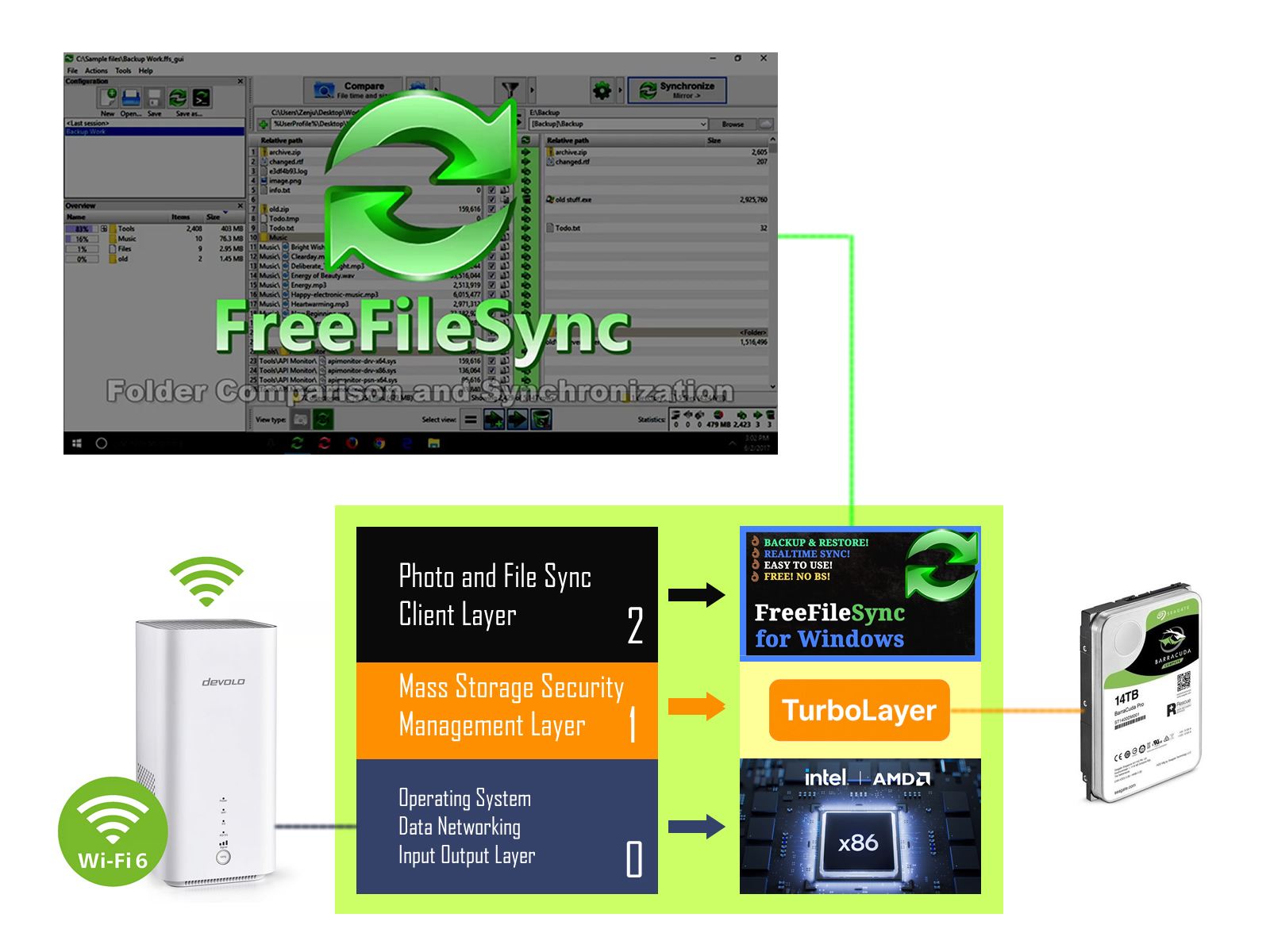
A friend recently approached me with a common dilemma: how to access precious files—specifically, fond memories saved as pictures—stored on an old, non-functional Windows 7 laptop. He needed a solution that would allow him to view these files frequently over his home Wi-Fi network—as if it were a local drive—without permanently moving them or performing a disruptive operating system upgrade.
The core issue was that the Windows 7 system was completely unbootable, meaning the standard method of file access was out. Crucially, the cook wanted to maintain the illusion of a "local drive" experience over the network.
To access the files while keeping the original hard drive intact, I proposed using Ubuntu. As a popular, lightweight Linux distribution, Ubuntu is exceptionally efficient at rejuvenating older hardware and is perfect for tasks where the original OS has failed. Since my core business is high-performance Wi-Fi and antennas, I knew the solution had to prioritize reliable network stability as much as file access.
Why Pay for This Solution? Smart, Affordable, Portable Wi-Fi Storage
Creating a reliable, truly bootable Linux USB drive that functions seamlessly across a wide range of x86 hardware is notoriously difficult—a hurdle that often prevents successful DIY projects. The TurboLayer NAS platform is built on solving these frustrating, hidden compatibility issues.
We invested considerable time and expertise required to solve these problems, offering significant value propositions in Mass Storage Security Management and Hardware Compatibility:
- Superior Value: Our solution leverages your existing laptop hardware, offering enterprise-grade server capabilities at a fraction of the cost of buying a new, specialized NAS enclosure.
- Integrated Free File Sync: The TurboLayer OS provides the ideal platform to run powerful, open-source file synchronization tools on the top layer. This enables automated, bi-directional sync between your TurboLayer NAS, client devices, and even other cloud storage services.
- Hidden Compatibility Issues Solved: Our pre-configured image fixes complex file structures and boot loader settings (UEFI, Legacy, GRUB) that commonly fail when the boot drive is switched between different generations of hardware.
- Internal Drive Protection: The entire operating system runs off the external USB drive, meaning your **laptop's internal disk and original OS remain 100% untouched** and completely isolated from the server environment.
Our pre-configured image significantly increases your chance of success, tackling these common compatibility headaches right out of the box, making it an enjoyable weekend project.
There were two great benefits to this approach:
- Universal Compatibility: This USB-based solution works on both new and legacy x86 Windows laptops and desktops, giving old PCs a second life, even if they don't meet current OS requirements.
- Non-Destructive Access: The approach is completely safe. The bootable USB stick bypasses the internal system and does not make a single scratch on the laptop's original hard drive. The precious pictures are never at risk.
The solution was simple, effective, and non-destructive: I created a persistent, bootable Ubuntu environment on a USB memory stick (the platform in our Instant Wi-Fi Server Access Kit). By booting the old laptop from the USB drive, we were able to safely bypass the broken Windows 7 installation, mount the internal hard drive, and configure a simple file-sharing service (like Samba or copyparty).
This setup achieved exactly what he needed: the old laptop could now act as a dedicated, self-hosted file server, allowing him to access his files as if they were on a local drive using his phone or any other PC on the network.
Pretty neat, right?
Read on to see how you can apply this non-destructive file revival technique to your own legacy hardware...
Steps to Make It Yours: Instant Access in Minutes
With our pre-configured image, setting up your personal Wi-Fi File Server is fast and straightforward. (Remember to consider adding our optional Wi-Fi Booster Antenna for the most reliable connection.)
- Insert & Boot: Insert the prepared USB stick into your laptop or PC. Power on the machine and press the Boot Menu Key (often F7, F10, F12, or Esc) to choose the USB drive as the startup option.
- Connect Wi-Fi: Once the system boots from the stick, connect the laptop to your home Wi-Fi network.
- Disk Setup: Follow the user-friendly prompts from the pre-installed TurboLayer NAS software to manage the laptop's internal disk and set up user access.
- Map Your Drive: On your main computer or phone, simply map the network drive (or "Add a Network Location") to the new server's address. (We recommend using the term "Home Computer" instead of "client" for simplicity.)
- Enjoy Access: That's it! You can now access your files and photos instantly over your Wi-Fi network.
Other Self-Hosted Applications Your New Server Can Run Concurrently
Your revived laptop isn't just a basic file server—it’s a powerful, low-cost platform for running advanced, private services. All these applications can be set up using lightweight Docker containers to run simultaneously with minimal performance impact:
| Application / Service | Primary Function | Key Benefit (Why Self-Host?) |
|---|---|---|
| Nextcloud | Private Cloud Sync & Share | The easiest way to self-host a full Dropbox/Google Drive replacement, giving you total ownership of your files, calendar, and contacts. |
| TurboLayer VPN | Remote Access & Network Tunneling | Securely access your entire home network (including files) from anywhere in the world using your private connection. |
| RustDesk | Private Remote Desktop Control | A self-hosted, secure alternative to TeamViewer, allowing you to control other devices remotely without relying on third-party servers. |
| Vaultwarden | Encrypted Password Manager | Host an open-source password vault that is 100% under your control, ensuring perfect privacy for your credentials. |
| Kopia | Secure, Deduplicated Backup | Manages complex backup strategies needed for the crucial **3-2-1 Backup Rule** (offsite, compressed, encrypted). |
| PairDrop | Cross-Platform File Transfer | The simple, fast solution for sending large files between phones, tablets, and PCs (like AirDrop, but for all devices). |
| copyparty | Reliable File Upload Server | Allows simple, browser-based uploads and media sharing without frustrating cloud service timeouts or restarts. |
| BentoPDF / Vert | Document & File Conversion Tools | Run productivity tasks locally, keeping sensitive documents and files away from online conversion services. |