Ditch 15GB Cloud Barrier Auto Photo Sync

Ditch 15GB Cloud Barrier Auto Photo Sync

Why pay for cloud quotas when the tools for absolute privacy are right here? Sync your photos to your own disks and break the 15GB barrier forever.

If you're like me, you've probably hit a wall with Google Photos. You pay for a cloud service, but you constantly struggle with that frustrating 15GB limit—especially when your phone has 128GB of camera memories! It's a lose-lose situation: either you pay escalating fees, or you risk losing access to your memories when Google decides to shut down your storage.

My biggest fear was the lack of control. I wanted a photo sync solution that was fast, unlimited, and where the photos stayed right here, under my roof. That's why I added Nextcloud to my self-hosting platform.


The Perfect Photo Sync Alternative

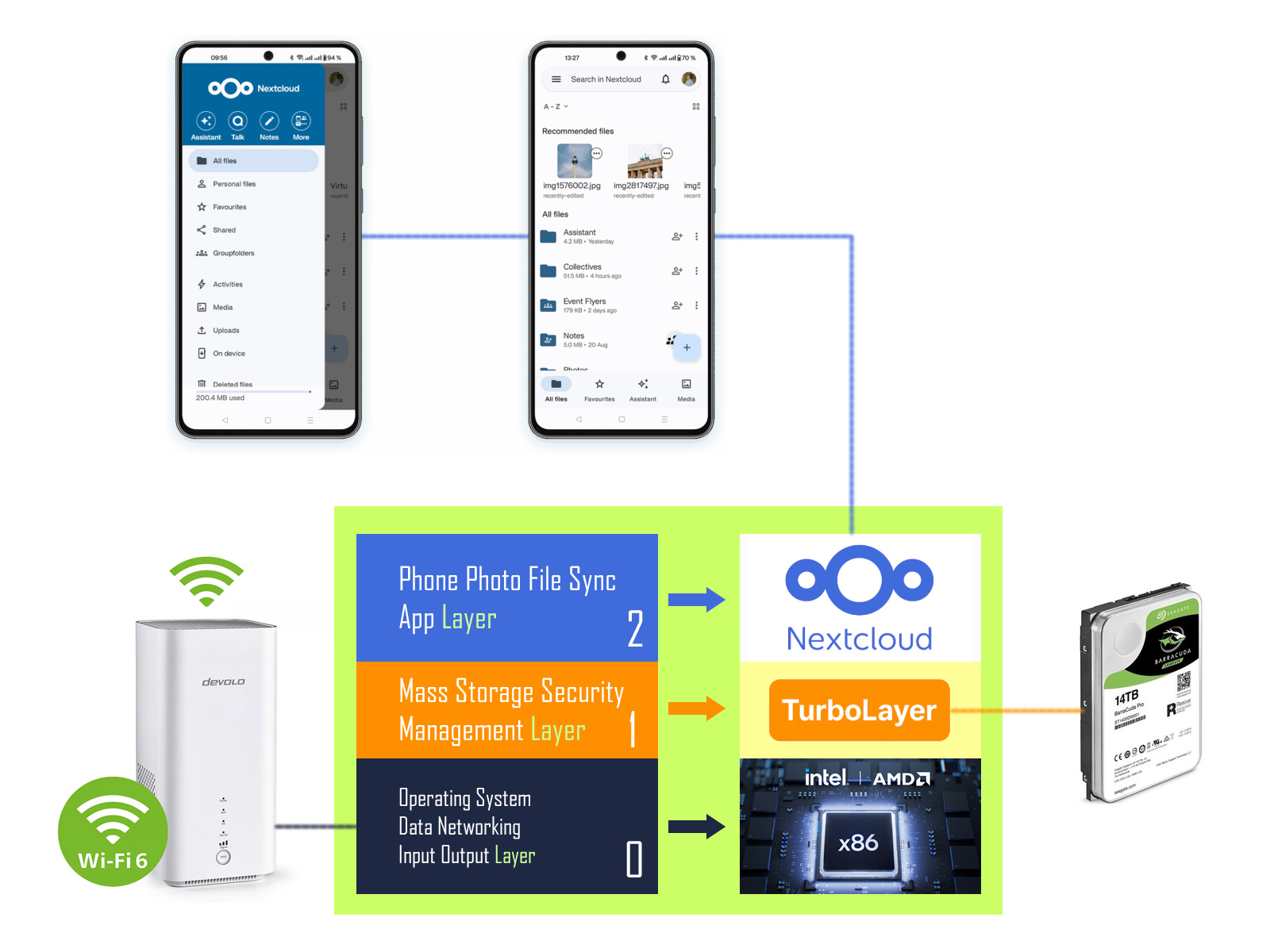
By leveraging the TurboLayer NAS server, you can set up a private, high-capacity cloud that works exactly like Google Photos—but better: it's free from monthly fees and limits, and you own the data.

This solution gives you:

  • Unlimited Storage: Your limit is only the size of the hard drive in your old laptop.
  • Total Privacy: Photos are encrypted and stored on your hardware, not on a third-party server.
  • Seamless Android Sync: The Nextcloud app offers an "Instant Upload" feature that automatically backs up new photos whenever you connect to your home Wi-Fi.

How Does Nextcloud Make Money If It's Free?

This is a common question! Nextcloud is an open-source project. They generate revenue by selling mandatory support, compliance, and advanced features to large enterprises and governments—not by charging individual users for basic file sync. You get the full power of their solution for free because you are running the system yourself.


Pain Point Solved The Nextcloud DIY Solution The TurboLayer Solution
Setup Difficulty Requires hours of complex manual configuration (Linux OS, web server, database, security certificates, Docker setup, etc.). Instant Activation: The image is pre-configured with the entire environment (OS, Docker, network drivers) ready to run Nextcloud and all other apps *immediately*.
Hardware Compatibility Requires extensive troubleshooting to get the OS, drivers, and USB stick to boot correctly across different generations of Dell, HP, or Lenovo x86 PCs. Guaranteed Compatibility: TurboLayer is custom-tuned to boot reliably on a wide range of legacy x86 hardware, saving you days of frustrating boot-loop errors.
Networking & Speed File sharing (NAS) and VPN stability are often unstable on unoptimized, legacy hardware, leading to slow transfers and connection dropouts. Optimized Platform: TurboLayer focuses on reliable networking (Layer 1 & 2), ensuring stable Wi-Fi performance and fast transfer speeds for all your self-hosted apps.
Time & Frustration The high "Give Up" moment—most DIY attempts fail due to hidden software conflicts and technical overhead. You Buy Back Your Time: You are purchasing our time and expertise to solve the complex underlying technical hurdles, allowing you to go from USB insert to functioning private server in minutes.

Setting Up Your Private Photo Cloud

The TurboLayer NAS stick is pre-configured to handle powerful applications like Nextcloud using Docker containers. This process takes minutes and transforms your server's utility:

  1. Prepare the Server: Access the terminal on your TurboLayer laptop and run the necessary Docker commands to set up the database (MariaDB) and the Nextcloud container. (Find the specific command lines in the TurboLayer Documentation Hub).
  2. Initial Configuration: Navigate to your server's IP address and port (e.g., http://192.168.1.50:8080) on any browser to create your admin account and link the database.
  3. Install on Android: Download the official Nextcloud App from the Google Play Store.
  4. Activate Instant Upload: In the Nextcloud mobile app, connect to your server's address and enable the "Auto Upload" feature.

Your private photo cloud is now active. You have traded restrictive cloud quotas for total digital sovereignty, ensuring your memories remain private and accessible without the burden of cloud-storage fees.

Ditch 15GB Cloud Barrier Auto Photo Sync

Why pay for cloud quotas when the tools for absolute privacy are right here? Sync your photos to your own disks and break the 15GB barrier forever.

If you're like me, you've probably hit a wall with Google Photos. You pay for a cloud service, but you constantly struggle with that frustrating 15GB limit—especially when your phone has 128GB of camera memories! It's a lose-lose situation: either you pay escalating fees, or you risk losing access to your memories when Google decides to shut down your storage.

My biggest fear was the lack of control. I wanted a photo sync solution that was fast, unlimited, and where the photos stayed right here, under my roof. That's why I added Nextcloud to my self-hosting platform.


The Perfect Photo Sync Alternative

By leveraging the TurboLayer NAS server, you can set up a private, high-capacity cloud that works exactly like Google Photos—but better: it's free from monthly fees and limits, and you own the data.

This solution gives you:

  • Unlimited Storage: Your limit is only the size of the hard drive in your old laptop.
  • Total Privacy: Photos are encrypted and stored on your hardware, not on a third-party server.
  • Seamless Android Sync: The Nextcloud app offers an "Instant Upload" feature that automatically backs up new photos whenever you connect to your home Wi-Fi.

How Does Nextcloud Make Money If It's Free?

This is a common question! Nextcloud is an open-source project. They generate revenue by selling mandatory support, compliance, and advanced features to large enterprises and governments—not by charging individual users for basic file sync. You get the full power of their solution for free because you are running the system yourself.


Pain Point Solved The Nextcloud DIY Solution The TurboLayer Solution
Setup Difficulty Requires hours of complex manual configuration (Linux OS, web server, database, security certificates, Docker setup, etc.). Instant Activation: The image is pre-configured with the entire environment (OS, Docker, network drivers) ready to run Nextcloud and all other apps *immediately*.
Hardware Compatibility Requires extensive troubleshooting to get the OS, drivers, and USB stick to boot correctly across different generations of Dell, HP, or Lenovo x86 PCs. Guaranteed Compatibility: TurboLayer is custom-tuned to boot reliably on a wide range of legacy x86 hardware, saving you days of frustrating boot-loop errors.
Networking & Speed File sharing (NAS) and VPN stability are often unstable on unoptimized, legacy hardware, leading to slow transfers and connection dropouts. Optimized Platform: TurboLayer focuses on reliable networking (Layer 1 & 2), ensuring stable Wi-Fi performance and fast transfer speeds for all your self-hosted apps.
Time & Frustration The high "Give Up" moment—most DIY attempts fail due to hidden software conflicts and technical overhead. You Buy Back Your Time: You are purchasing our time and expertise to solve the complex underlying technical hurdles, allowing you to go from USB insert to functioning private server in minutes.

Setting Up Your Private Photo Cloud

The TurboLayer NAS stick is pre-configured to handle powerful applications like Nextcloud using Docker containers. This process takes minutes and transforms your server's utility:

  1. Prepare the Server: Access the terminal on your TurboLayer laptop and run the necessary Docker commands to set up the database (MariaDB) and the Nextcloud container. (Find the specific command lines in the TurboLayer Documentation Hub).
  2. Initial Configuration: Navigate to your server's IP address and port (e.g., http://192.168.1.50:8080) on any browser to create your admin account and link the database.
  3. Install on Android: Download the official Nextcloud App from the Google Play Store.
  4. Activate Instant Upload: In the Nextcloud mobile app, connect to your server's address and enable the "Auto Upload" feature.

Your private photo cloud is now active. You have traded restrictive cloud quotas for total digital sovereignty, ensuring your memories remain private and accessible without the burden of cloud-storage fees.